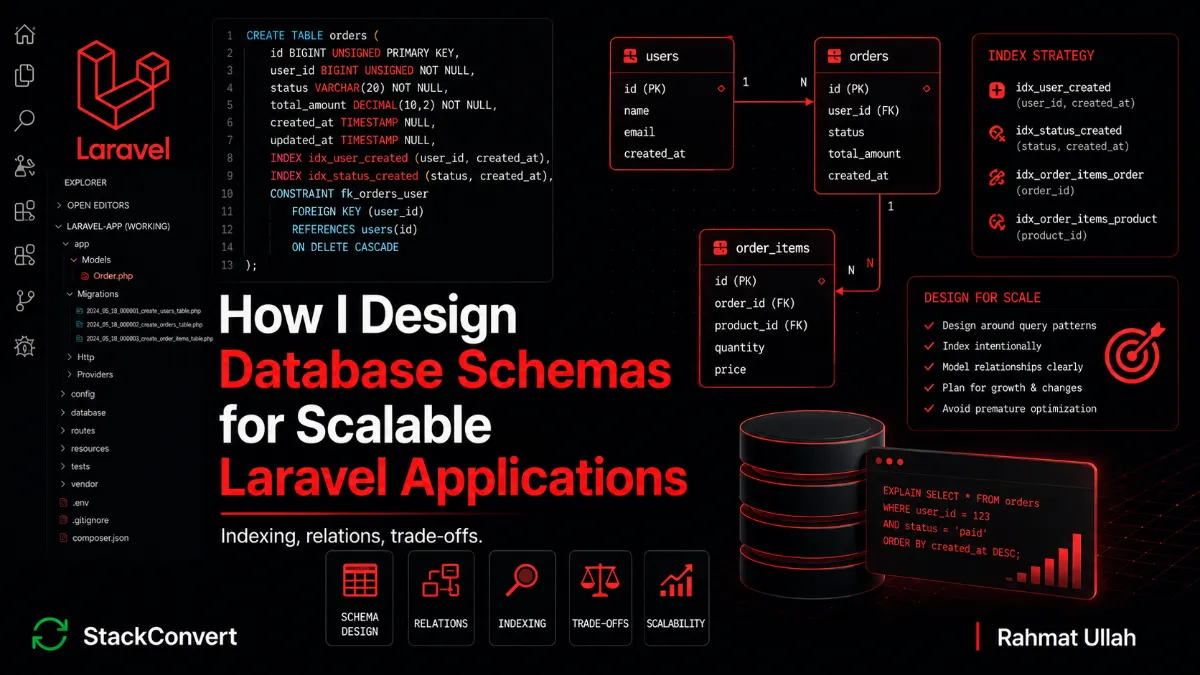
How I Design Database Schemas for Scalable Laravel Applications
 Rahmat Ullah
Most database problems are created long before the first slow query. Bad schema design rarely hurts on day one. It hurts six months later, when the data gets real, the table has eight million rows, and a report that used to take 40ms now times out the request.
Schema decisions compound. Every shortcut you take to ship faster this sprint becomes a constraint the entire application has to work around later. The convenient nullable column, the vague status string, the missing index nobody noticed: none of them announce themselves. They just quietly make every layer above them harder until someone has to stop feature work and untangle it.
This is the ninth post in my Laravel series. I have written about the mistakes I stopped making, scalable application structure, performance work in production, API design, authentication and authorization, abstraction trade-offs, third-party integrations, and debugging production issues. This one is about the layer everything else sits on.
Schema design is not a one-time decision. It is architecture. Here is how I approach Laravel database design now.
Table of Contents
The Real Problem
Most developers think about the database in three separate boxes. Performance is query optimization. Scaling is adding a cache. Schema is something you decide once, early, and rarely revisit.
None of that holds up. Query optimization can only rescue a schema that was reasonable to begin with. You cannot index your way out of a table that stores three concepts in one row. A cache hides a slow query until the cache is cold, the data is stale, or the access pattern shifts, and then you are debugging two problems instead of one. And the schema is never decided once. It is decided every time someone adds a migration, and most of those migrations are written under deadline pressure by someone who is not thinking about row counts in two years.
A bad schema does not just produce slow queries. It produces awkward joins, duplicated data that drifts out of sync, business rules that are impossible to enforce, and migrations that are terrifying to run because the table is too hot to lock. The application code on top inherits all of it: every workaround, every defensive if, every "we have to load the whole thing to figure out what state it is in."
Schema design is architecture. It deserves the same deliberate thinking you give to your service layer or your API contracts, because it outlives all of them.
Common Mistakes I See
These are the patterns I run into again and again, in code I have inherited and in code I wrote before I knew better:
- Missing indexes on columns that every dashboard query filters by. It works in development with 200 rows and falls over at 2 million.
- Indexing blindly. The opposite mistake. An index on every column "just in case," each one slowing down every write and bloating storage for queries that never run.
- Over-normalization that turns a simple read into a six-table join, because someone followed normal-form theory past the point of usefulness.
- Premature denormalization. Copying fields around for a performance problem that does not exist yet, and now those copies drift apart.
- Storing multiple values in one column, like comma-separated IDs or a JSON blob of relational data, which makes filtering and joining either impossible or painfully slow.
- Weak foreign key design: no constraints, no indexes on the foreign key, orphaned rows nobody notices until a report double-counts.
- Nullable columns everywhere, used as an escape hatch instead of a deliberate "this value is genuinely optional" decision.
- Ambiguous naming. Columns called
data,type,flag, orinfo, whose meaning lives in someone's head rather than the schema. - Mixing business states into a vague string field, so
status = 'active'means four different things depending on which other columns are set. - Not thinking about query patterns at all, designing the schema to look tidy on a diagram instead of designing it for how the application actually reads and writes.
None of these are exotic. Every one of them is a normal decision that looked fine in the pull request and became a production problem once the data got real.
How I Design Schemas Now
The shift that mattered most was simple. I stopped designing schemas to look correct and started designing them to be used.
Design around query patterns
Before I write a migration, I write down how the data will be read. Not how it looks conceptually, but how the application will actually query it. The dashboard that lists a tenant's recent orders. The report that aggregates revenue by month. The filter on status. The sort by scheduled date. Those access patterns are the real specification.
A schema that models the domain perfectly but ignores its three hottest queries is a schema that will get patched with indexes, cached, and eventually rewritten. I would rather design for the read path up front. It costs a little more thought upfront and saves a rewrite later.
Relationships, intentionally
One-to-many is the default and it is almost always right: a clear foreign key, a constraint, an index. I reach for it first and only move on if it genuinely does not fit.
Many-to-many is fine, but the pivot table is a real table. It deserves a name that means something, its own timestamps when the relationship has a lifecycle, and a unique constraint on the pair so you do not get silent duplicates.
Polymorphic relationships are where I am most cautious. They are convenient, since one comments table can serve posts, videos, and products at once. The cost is mostly structural. The database cannot enforce native foreign key constraints on polymorphic relationships, so referential integrity has to move into application code, and your indexes have to cover the (type, id) pair rather than one clean key. None of that makes them wrong. I still use them for genuinely uniform, peripheral concerns like comments or attachments. I just keep them away from anything central to the domain, where I would rather have enforceable constraints and straightforward joins even if it means a few more tables.
Indexing deliberately
Indexes follow access patterns, not column names and not a checklist. If a query filters on it, sorts on it, or joins on it, it is an index candidate. If nothing queries it, it is not.
The biggest practical win is composite indexes that match a real query. A multi-tenant dashboard that loads recent orders for a tenant wants:
// Matches: WHERE tenant_id = ? ORDER BY created_at DESC
$table->index(['tenant_id', 'created_at']);

// Matches: WHERE status = ? AND scheduled_at <= ?
$table->index(['status', 'scheduled_at']);
Column order matters here. The index supports filtering on the leftmost columns and ranging or sorting on the rest, so two separate single-column indexes do not give you the same thing.
Foreign keys that participate in joins or cascades should be indexed, which in practice is almost always the case. Laravel's foreignId() often creates indexed foreign key columns depending on how the constraint is declared, but I still verify it, because an unindexed foreign key turns every join and every cascade into a table scan.
And I stay aware of the cost. Every index is paid for on every insert, update, and delete. Over-indexing a write-heavy table is its own performance bug. The goal is the smallest set of indexes that covers the queries that actually run.
Normalize until it hurts, denormalize when justified
My default is normalized. One fact, one place. It keeps writes simple and makes "the data is wrong" a much rarer conversation.
But I am not dogmatic about it. Denormalization is a legitimate tool when there is a measured reason, like a reporting query that joins five tables on every page load, or an aggregate that is expensive to compute and read constantly. In those cases I will store a total_cents on the order or a comments_count on the post, but only with one explicit owner responsible for keeping it correct.
In my projects that owner is a dedicated service or action class, the same place the write that changes the underlying data already lives. When an order item is added or removed, the action that performs that change is also the thing that recalculates and persists the total. I deliberately avoid spreading that responsibility across model events or scattered callbacks. Once two code paths can both update the same derived column, it will eventually drift, and you will not find out until a report disagrees with itself.
The rule I hold to is to denormalize for a problem you can point at, not a problem you are imagining. Premature denormalization is just duplication waiting to drift.
State modeling
Vague status fields are one of the most expensive mistakes I see, because they look harmless. status = 'active' seems clear until you realize "active" means "paid but not shipped" in one place and "shipped but not delivered" in another, and the only way to tell is to read three other columns.
I model the lifecycle explicitly instead. The states are named, finite, and the column only accepts one of them:
// A short, constrained status column backed by a PHP enum cast
$table->string('status', 20)->default('pending');

$table->timestamp('confirmed_at')->nullable();
$table->timestamp('fulfilled_at')->nullable();

// In the model:
// protected $casts = ['status' => OrderStatus::class];
A database enum column would also work, and it pushes the constraint all the way down to the storage layer. The trade-off is portability and maintenance. MySQL's enum is awkward to evolve, since adding or renaming a state is an ALTER TABLE, and it does not port cleanly to other databases. These days I usually reach for a short string column backed by a PHP enum and an Eloquent cast. The application enforces the finite set, the cast keeps the code type-safe, and the column stays portable. If I also want the database itself to reject bad values, a CHECK constraint on the string does that without locking me into the enum type. There is no single right answer here, but whichever you pick, the set of states should be named and finite, not free text.
Now the state is in the schema, not in tribal knowledge. Queries are obvious, invalid transitions are catchable, and a new engineer can read the migration and understand the domain. State modeling is where schema clarity pays back the most.
Migrations that survive a hot table
On a small table, a migration is a non-event. On a table with tens of millions of rows that is being read and written constantly, the same migration can lock the table long enough to take the application down. Once you have a scaling problem, every schema change is also a deployment risk, so I plan the migration with the same care as the schema itself.
A few rules I follow on hot tables:
- Build indexes online. Postgres has
CREATE INDEX CONCURRENTLY, and modern MySQL handles mostALTERs in place without a full lock. I still check the behaviour for the specific change before running it, and I run it off-peak. - Add columns in stages. Add the column as nullable or with no default first, backfill it, then add the constraint. Adding a non-nullable column with a default in one step is the classic way to lock a large table.
- Backfill in chunks, not in one statement. A single
UPDATEacross ten million rows holds locks and bloats the transaction log. A chunked, throttled, resumable job is slower on paper and far safer in practice. - Split risky changes across deploys. Renaming or dropping a column becomes add-new, dual-write, backfill, switch reads, then drop-old. More steps, but every step is reversible and none of them need downtime.
Laravel does not do any of this for you. The migration file will happily run a table-locking statement in production. The schema design and the migration plan are the same job, and treating them separately is how a routine deploy turns into an incident.
A Real Production Example
A multi-tenant application I worked on had an orders table that started simple and grew the way these things do. The original design was reasonable for a small dataset: a tenant_id, a free-text status string, no composite index, and a JSON meta column where line-item data had quietly accumulated because it was easier than a second table.
The main tenant dashboard ran the obvious query: this tenant's orders, newest first, filtered by status. With a few thousand rows it returned instantly. Somewhere past four million rows across all tenants, that same query started taking two to three seconds, and at peak it tipped over into request timeouts. It was not a clean cliff either. It got gradually worse for weeks before anyone treated it as a real problem, which is the usual way these things go.
The diagnosis was not subtle once we actually looked. There was an index on tenant_id alone, so the database filtered to one tenant and then sorted the entire result set by created_at on every request, a filesort over tens of thousands of rows. The status filter could not use an index at all, because status was a free-text column with inconsistent values. And the reporting job that aggregated revenue was parsing the JSON meta column in PHP, because the numbers were not queryable in SQL.
The redesign was not dramatic, but it was not one clean migration either. It took roughly two weeks of small, reversible steps:
- Added a composite index on
(tenant_id, status, created_at)so the hot dashboard query could be served from the index. We built it online and off-peak, because the table was far too active to lock. - Cleaned up
statusbefore constraining it. This was the unglamorous part. Years of slightly different code paths had left half a dozen near-duplicate values likecomplete,completed, andCompleted, and the backfill needed two passes plus a manual review of a few hundred genuinely ambiguous rows. - Moved
statusto a short, constrained string backed by a PHP enum once the data was consistent. We deliberately did not use a databaseenumcolumn, because we already knew the state list would keep changing. - Pulled line items out of the JSON
metablob into a properorder_itemstable. New writes went to the new table immediately, and old rows were backfilled in chunks over several days while both representations were kept in sync. - Added a denormalized
total_centsonorders, owned by the order service that already handled item changes, so there was exactly one place responsible for keeping it correct.
The dashboard query went from two-to-three seconds back to single-digit milliseconds, and the revenue report stopped timing out because it was reading an indexed integer column instead of parsing JSON. It was not a flawless project. We found two more places still reading the old JSON blob weeks later, and the meta column itself stuck around far longer than anyone wanted, because nothing forces you to finish a cleanup once the pain is gone. But the schema stopped fighting the application, and that was the point. That migration is the clearest example I have of why I now design for the read path first, and why I treat the migration plan as part of the design rather than an afterthought.
What I Avoid Now
- JSON columns standing in for relational data. JSON columns are genuinely useful for unstructured or rarely-queried payloads, like a webhook body, a flexible settings blob, or a third-party response I want to keep verbatim. They become a problem when they hold structured data I frequently filter, join, or aggregate on. Modern databases can index inside JSON, so this is not an absolute rule, but if a value is central to my queries it usually earns its own column.
- Reaching for polymorphic relationships on core tables. Fine for peripheral concerns, but on central domain tables the missing database-level constraints and the more involved indexing tend to cost more than the convenience saves.
- Indexing every column. Indexes are not free. A write-heavy table with twelve indexes has a write performance problem nobody planned.
- Free-text status fields. If a column represents a finite set of states, constrain it somewhere, whether that is a PHP enum, a check constraint, or a lookup table. Just not free text.
- Nullable columns as a design escape hatch. Nullable should mean "genuinely optional," not "I did not want to think about a default or a separate table."
- Ignoring migration strategy. On a large, hot table, adding a column or an index can lock it. I think about how a migration runs in production, not just whether it runs, before I write it.
Key Principles I Follow
- Design for access patterns. How the data is read is the real specification.
- Index intentionally. Indexes follow queries that exist, not columns that might be queried.
- Schema clarity beats cleverness. A boring, explicit schema is one a new engineer can read and trust.
- Relationships are contracts. Foreign keys and constraints are the database enforcing your rules so your code does not have to.
- Future migrations matter. The schema is never finished, so design it so it can change safely under load.
- Scaling starts in schema design. Long before the cache layer, long before read replicas.
Closing Thoughts
Good schemas make the application simpler. The business rules are enforceable, the queries are obvious, the reports are fast, and the migrations are routine. Bad schemas make every layer above them harder, because the models work around the structure, the services work around the models, and the API works around the services.
You cannot cache or optimize your way out of a schema that was wrong from the start. You can only rewrite it, usually at the worst possible time, on the hottest possible table.
Scalable Laravel applications are not built on clever query tricks. They are built on schemas that were designed deliberately, around real access patterns, before the data got real.
What schema design mistake taught you the most?